
How to Write an App Store Description
Often, you see those catchy descriptions on the App Store and wonder what is so special about them. How can a description lead the user to convert? Well, ASO (App Store Optimization) is behind that. ASO is all about optimizing the play store listing so that apps can get downloads. One of the major parts of ASO is the app store description. Most people have very good apps, but they don’t know how to write an app store description.
App store descriptions play an important role in getting downloads. It is where people can know about the app in detail before they download it. Think of it as an instruction manual that comes with any gadget when you buy it. The same is the app store description; it has all the information and details about the app so that users can read it. By reading the full app description, users get an idea of what that app is about and if it is worth downloading or not.
It would not be wrong to say that the app store description can affect the user’s decision for downloading the app. So you have to pay attention to it and prepare a well written and engaging description that actually converts users to download.
If you are also one of those individuals who is struggling with writing an app store description, then this guide is for you. In this guide, we will see a step by step guide on how to write an app store description.
How to Write an App Store Description
Developing great apps but failing to write good app store descriptions for it?? No more worries now. Here is a step-by-step guide for you on how to write an app store description.
Step 1: Understand Your Audience
The first step in how to write an app store description is to understand your audience. Understanding your audience is a key step in writing a great app store description. Identify what problems users are facing and present your app as a solution to their problems. You need to identify their pain points and tailor your app description according to it. Knowing about your audience in advance will save your time and help you to write an effective app store description.
Step 2: Do the Keyword Research
Keywords play a pivotal role in app store descriptions and in making your app discoverable on the Play Store. When a user makes any search, then the play store matches that query with relevant keywords in the description, and if the query matches with keywords in the description, that app is displayed to the users in the results.
You can do the keyword research using third-party tools like Google Keyword Planner. Apptweak, Fox Data. App Annie, App Radar, Sensor Tower, etc. These tools can help you find relevant keywords for your app and see insights like where your app is ranking on and which kind of keywords your competitors are using.
Once you have completed your keyword research, mark your primary and secondary keywords. You should use your primary keyword in the title, short description, and long description. Try to use the keyword naturally throughout your description and avoid keyword stuffing. Strategically incorporating the keywords into the description will effectively improve your app’s ranking.
Step 3: Write the Short Description
After you have completed your keyword research, start writing the app store description. Begin by writing a short description.
In the Google Play Store, you have a character limit of 80. You have to keep your short description within this limit.
In the Apple App Store, there is subtitle rather than short description and has a character limit of 30. You have to keep your subtitle within this limit.
Follow the character limit, use the primary keyword in the short description/subtitle, and make it catchy and engaging, as it is the very first thing that users see after the app title and store graphics.
Step 4: Write the Long Description
Now comes the most important part of how to write an app store description i.e, writing the long description. It is the most important part that you pay a lot of attention to. For the Google Play Store and Apple App Store, you have a character limit of 40000 to write your app store description.
- Start with a catchy hook that grabs readers’ attention and interests them to read the whole description.
- Then introduce your app to the users. Use the primary keyword in the first line of the introductory paragraph. Present your app’s main value in the introduction.
- Then highlight the features (what the app does) of your app. Tell about each feature with a bit of detail so that users can understand it easily. Present features in such a way that it appears as a solution to the users problems.
- List the benefits (how it helps users)of your app, tell users how and what benefit they will get from your app, and how it will act as their problem solver.
- Highlight your unique selling points, tell what sets your app apart from other apps on the app store.
- Use the primary and secondary keywords naturally throughout the description.
- Write in clear and concise language that is simple for users to understand and avoid using jargon words.
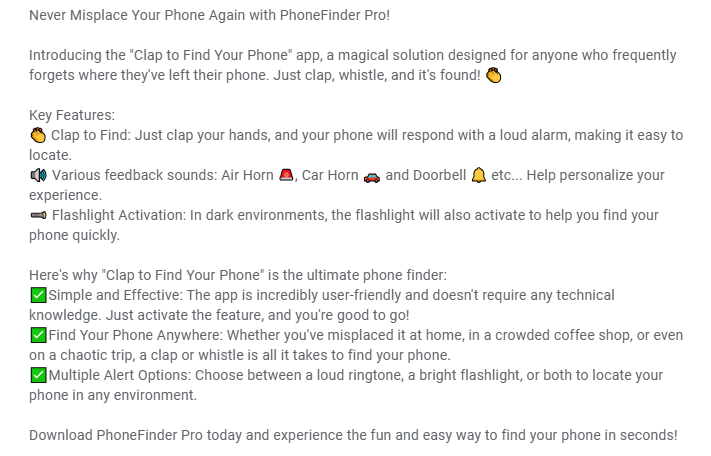
- Structure your app description well, use proper headings/subheadings, bullet points, and numbered lists to present the information. Bold or underline the important points. Make use of relevant emojis where necessary.
A well written and properly structured description makes it easier for users to read and understand it fully, and lets them decide whether they will download the app or not.
Step 5: Include Social Proof
You need to include social proof in your description to convince users that your app is worth downloading. Include any positive reviews, testimonials, awards, or endorsement from reputable platforms that signal trust and credibility to the users. When users see that other people had a good experience with your app, it reduces the uncertainty and converts them to download your app. Social proofs act as a validation signal and relatively increase the number of downloads on your app.
Step 6: Use CTAs
The other important thing to learn in how to write an app store description is the use of CTAs in your app description. A strong CTA can potentially increase the number of downloads. It’s best to end your description with CTAs like Download Now, Try it free, Download Now and see the magic, Get started in minutes, etc. Adding CTAs creates a sense of urgency among users and encourages them to download your app.
Step 7: Add FAQ
Incorporate a FAQ at the end of your app description. It will be very helpful for the readers who might have any questions regarding your app. Don’t add just generic questions; add such questions that the user might need to ask after reading the full app description. Add 3-5 relevant questions; it will help to increase the readability of your app store description.
Step 8: Keep Updating
Your work doesn’t end just by writing the description and making it live. You also have to keep updating with the time. Over time, keywords may change, so you have to update your app store short & long description with new keywords. Every time you add a new feature to the app or fix the bugs, you should mention it in your app store description. By regularly updating your app store description, you signal trust to both Play Store and the user.
Tips to Write App Store Description
- Localize your app description in different languages to reach out to a diverse audience.
- Avoid keyword stuffing.
- Don’t use overly compelling words like “#1”. “Top”, “best” as it is against the Play Store policies.
- Be particular when writing the description; don’t use generic phrases.
- Focus on clearly mentioning each and every benefit of your app.
- Write in simple language and do not use too many technical terms.
- Structure your app description into short paragraphs so that users can easily read and understand.
- Always write your description in such a way that it presents a solution to the user’s problem.
- Keep your app store description updated with new keywords and new features.
Writing an app store description is not just about filling the space with words so that you can publish your app. It is a key factor in deciding whether to download the app or not. If you have a great app, but you are not getting downloads, then you might need to work on your play store description. The above steps have clearly explained how to write an app store description. By following the above steps, you can effectively write app store descriptions that actually convert.
So what are you waiting for, now that you have this guide on how to write a good app store description, start writing your app description now that actually brings downloads.
Want more practical writing guides? Explore our writing guides.