
How to Write a Meta Description For a Blog Post

Struggling to grab user attention for your blog in search results? Well, knowing how to write a meta description for a blog post can make all the difference. When users see your blog post in the search results, they only see a small glimpse of its content, and by reading that small glimpse, they decide whether to click it or not. A well-crafted meta description can increase your website’s overall CTR and improves SEO indirectly.
If you are also struggling to write a great meta description for your blog post, then this guide is for you.
In this guide, you will discover some of the proven ways on how to write a meta description for a blog post and some of the tools that will help you write a meta description.
What is a Meta Description?
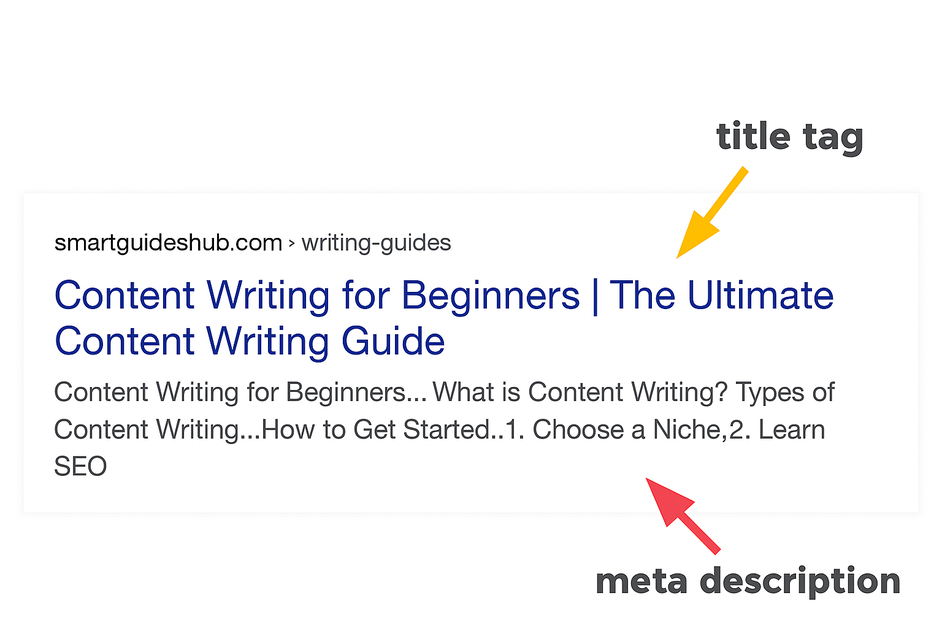
A meta description is a brief summary of your content in a few words that appears under the title in search results. It helps readers to understand what is in the article, and it will be worth reading for them or not. Meta descriptions basically tell readers what content they will find if they click on your blog post.
A good meta description should incorporate the following things:
- Include the focus keyword.
- Do not exceed the character limit.
- Should not be misleading, do not mention the things that are not in the content.
- Add the important points of the content precisely.
- Make it compelling enough to encourage readers to click.
Why Does a Good Meta Description Matter?
Although meta description does not count in Google ranking algorithm, it still matters for SEO to improve your websites ranking by increasing CTR, which in turn increases the user experience and engagement time. It provides users with a clear summary of your blog post content, which helps them to decide whether they should click and read your blog post or not. It helps search engine bots to get a quick summary of your page’s content, which lets them index your content accurately across user search. So writing a good meta description can increase your website’s visibility over time.
How to Write a Meta Description For a Blog Post
There are no specified rules defined by Google to write a good meta description. However, there are some of the best practices to write a good meta description.
Here are some of the ways on how to write a meta description for a blog post:
- Understand the search intent.
- Follow the character limit.
- Use the focus keyword naturally.
- Include CTAs
- Make it clear, concise, and engaging.
- Make it relevant to the blog post’s content.
1. Understand The Search Intent
The first thing in how to write a meta description for a blog post is to understand the search intent. Once you know the search intent, you will be able to write a meta description that directly aligns with the user’s search, which in turn will lead to clicks on your blog post. If your search intent is informational, then write a straightforward meta description that will educate users about the topic they are looking for. If the search intent is transactional, then write a meta description that highlights the benefits that can lead users to take action.
Example : If your blog post is related to Digital Product Passport topic, then you may write its informational and transactional meta description as:
For Informational Search Intent : What is Digital Product Passport? Learn how it works, why it matters for sustainability, how DPPs help brands improve transparency across the product lifecycle.
For Transactional Search Intent : Looking to implement a Digital Product Passport for your business? Discover how DPP solutions work, key benefits, steps to get started with compliance-ready tools.
2. Follow The Character Limit
The next important thing in writing a good meta description is to follow the ideal character limit i.e, 150-160 characters long. A meta description over this character limit will be truncated by Google, and users will not be able to see the complete text.
Try to mention the most important information in the first 110 characters. Google creates snippets of your blog post based on the following pixel length:
- 960 pixels for a desktop which makes 145-155 characters.
- 680 pixels for mobile which makes 110-130 characters.
If your meta description is not good enough, then Google will generate its own meta description by using some pieces of content from your blog post.
You have to keep a balance, it should not be too short that it misses out the important points nor too long that it prevents Google from displaying it completely. By following the character length you maintain the clarity, improves readability, and delivers a complete preview of your content.
3. Use Focus Keyword Naturally
Use of the focus keyword is another important thing that you need to understand in how to write a meta description for a blog post. You must have created your blog post using a meta description, so do include that keyword in your meta description to improve the relevance and make it stand out. Use it naturally and avoid keyword stuffing as Google considers it a spammy practice.
4. Include CTAs
Using a Call-To-Action (CTA) in your meta description encourages users to click. A meta description with CTA creates urgency and tells readers that your blog post has the exact information they are looking for. Use of phrases like “Learn more”, “Discover now”, “Start free trial now”, “Book your consultation now”, “Shop now” etc, makes your meta description more engaging and increases the chances of clicks on your blog post.
Example : If your blog post is on the topic of Generative Engine Optimization, then you can write a meta description with CTAs as:
Learn how to write geo-friendly content that ranks in AI overviews, attracts the right audience, and boosts visibility. Discover geo optimization in this guide.
5. Make it Clear, Concise, and Engaging
Try to make your meta description clear, concise, yet engaging enough that persuades users to click. Use more active voice phrases to keep the meta description direct and concise. Write in simple words that are easy for users to understand, instead of using difficult and jargon words, which can lower the chances of getting clicks. Write in such a way that when users read it, they get an idea of what is in your blog post.
6. Match it Relevant to The Blog Post’s Content
Another important part of how to write a meta description for a blog post is to make it relevant to the page’s content. A good meta description is one that summarizes the blog post’s content accurately to help users to decide if it is worth reading or not.
If Google finds that your meta description is just a trick to get clicks and is not relevant to the page’s content, you may be penalized for such a thing. Also, writing misleading meta descriptions will lead to an increase in bounce rate as users will leave your site without reading the content if they do not find it relevant.
Helpful Tools For Writing Meta Description
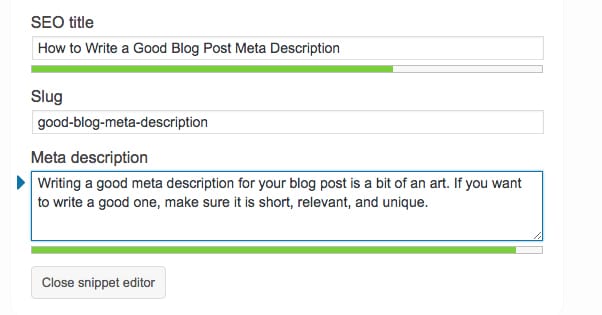
Along with learning how to write a meta description for a blog post, it is also important to know about the tool that helps you to write a meta description. Some of the popularly used tools for writing meta descriptions are:
- AI Tools like ChatGPT and other AI writing tools.
- Yoast SEO
- Rank Math
- Moz
- ToTheWeb
- SERP Snippet Preview Tools
Meta description acts as a mini content advertisement that promotes your blog post in search results. It’s a great way to attract user attention and get them to your blog posts. Creating meta descriptions by following the points like understanding the search intent, keeping the character limit in mind, including CTAs, etc, you can highlight the value of your blog post. By writing a good meta description, you are making sure that you are creating a better user experience and not missing any chance to attract the readers.
So what are you waiting for? Now that you have this guide on how to write a meta description for a blog post, start optimizing your blogs now and make every search impression count.
Read Also: SEO Content Writing For Beginners-A Comprehensive Guide